Tuesday, January 03, 2006

PowerGramo to record Skype conversations


PowerGramo is a powerful realtime recording solution for Skype. You can record and replay any Skype call easily and simply.
This free download is available for PC platform only at this point. I have not tried it, but thought it sounded very interesting. I listened to a conversation on a blog that had been recorded using it. The conversation was very clear. The directions suggest you transfer the PowerGramo .wav file to an mp3 file using Audacity. If you post to a blogger.com blog, you'll need to save the mp3 file to a web server for blogger to access.

Blog Safety


Blog Safety has many links for teens, parents, teachers and adult bloggers to learn about the benefits of safe blogging. Good tips, rules and advice presented well for teens and parents.

Sunday, January 01, 2006

Podcasting - Directions to start

Blogger is not our first choice for weblog-based podcasting. Movable Type and Wordpress are better solutions for many podcasters, because they offer better support for podcasting, more power and greater flexibility.
Nevertheless, many podcasters are finding Blogger to be a good starting place to experiment with podcasting. Blogger is a free service, and getting started is as easy as filling out some forms on the web.
Here's a quick guide to building a podcast with Blogger. You should be able to set up a podcast using Blogger and FeedBurner in about the time it takes for all the images on this page to finish loading!

The directions also suggest you use Audacity (a free download) to create your podcast. You need to link to the saved .MP3 file that you've stored on a server.

Seedwiki


seedwiki -to start a wiki or a blog you need an account, accounts are free, with no limits on the number of wikis or blogs or the number of participants the only information required is your name and email address
I've just started a wiki to help keep track of the wireless laptop cart in the BHS library. People will be able to reserve the cart by adding their name to a calendar that I made on the wiki. Others can freely change the page to keep track of the usage of the cart.

Sunday, December 18, 2005

Sir Tim has a blog!

Go read how the world so loves Sir Tim and the weely wonderful web he wove for us!

Saturday, December 10, 2005

Tim Talking in Lexington

Tim Berners-Lee speaking in Lexington 12/10/05


Tim Talks in Lexington


Waiting to hear Tim Berners-Lee begin speaking at the Museum of Our American Heritage, Lexington, MA on Saturday, Dec. 10, 2005.


Sunday, December 04, 2005

Setting up a blog for high school students

An English teacher in Arlington did this for her class. The kids didn't know each other's usernames, but she did. They knew she knew, but they didn't know who was who.
What I did to set up the blogs was a little labor intensive but saved me some headaches down the road. Basically, I set them all up and made passwords myself, then just gave the students their usernames and passwords. Blogger doesn't require that the email addresses be unique, so I set up a free dummy account on Yahoo and used that for all of the invitations ... the trick is that each invite only works once so you have to send the invite (while logged on to your blogger site), use it to set up that account (create username and password), and then send the next invite, repeat, repeat. So it really helped to set up all usernames and passwords in advance and put them in an Excel table so it was just "copy, switch apps, paste, tab," etc, etc. The other trick is to use two different browsers or even two computers side by side so that you don't have to log in and out of your own account each time.

Then I used that Excel table to do a mail merge in Word so that each student had some simple instructions to go with. I'll attach what that file looked like in case it can be of use.

Wednesday, November 30, 2005

No Nav Bar

If you don't want the top most navigation bar on your blog you can paste code into the template of your blog and remove it. This gets rid of the, Go to Next Blog option which may not always be a desirable option, especially with young bloggers. Click on the title to take you to the code directions.

Wednesday, November 16, 2005

Skype

Skype is a little program for making free calls over the internet to anyone else who also has Skype. It’s free and easy to download and use, and works with most computers.
I have loaded it to my 6 year old G3 at home and am looking for people to "skype" with. My name is su02420 (those are zeros, not o's as in my zipcode). The sound of the person you are talking to comes through the computer's speakers and is much like talking on a speaker phone. I have a mic plugged in and just sitting on my desktop and I can talk and type. We are planning to try Skype in Kindergarten classes to see if kids would be able to communicate between classrooms. There is a search feature that lets you see who else in online and interesting in having a chat. And they are ALL over the world! Definitely worth a try.

Friday, August 05, 2005

Photos onto a blog - EASY!

Blogger just made it possible to post images directly from your computer. You don't need Hello, or another middle man to help get the images to your blog. That's me with a smile.

HANNA in my chair
I posted this photo from my cell phone. I chose to send a photo message from my phone. I took the picture and then entered go@blogger.com as the address to send it to. I typed the caption and then sent the message. Blogger sent me back a code #. I entered the code # into the go.blogger.com web site and then directed blogger to send all future photos to this ..... or any other, blog.

Wednesday, April 20, 2005

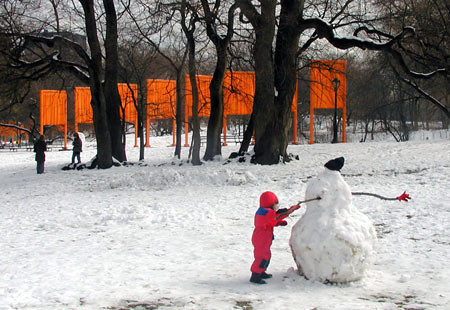
Christo Gates NYC 2/2005


01 Christo Gates, originally uploaded by 02420.

Playing in Central Park.
This photo added with flickr.com


You can use Hello and flickr to load images to a blog. With Hello you access the photos stored on the computer you are using to upload to the blog. With flickr.com you access the photos from a free web account in which the photos are stored. The flickr account allows you to upload and store 2 Mb. of photos every month.

Friday, April 08, 2005

Posting a recording to my blog

this is an audio post - click to play


Today I figured out how to post a recording to a blog! Wow!

Friday, April 01, 2005

April @ Cattail Corner

Well, there are mice nesting in my TWS @ BHS.....
And today I sent a school wide invite for teachers to post to the Cattail Corner blog Kim and Terry and I created last February. The latter is no April Fool.
Hope we can keep a journal of the wonderful puddle in our front yard at school.

Monday, February 14, 2005

AlphaSmart sending text to blog post

AlphaSmart loading a post to my blog


The AlphaSmart keyboard is attached to my laptop. I am logged into my blog with a new post open. On the AlphaSmart I open the file I want to send and press the SEND key on the AlphaSmart. It loads directly into the blog post.
When working with students, ahead of time I load all the images on separate posts. Then when the kids are ready to post their work, I open the post with their image and they SEND their words to the post that already shows their image.

Thursday, January 20, 2005

intranet page


Learned a few things today.....once the image is posted to my blog, I cannot edit the caption. A caption is a required item in order to see the Publish button become active and be able to post the image. If I try to edit the caption, when I delete the caption's words, the image goes, too. It would be good to put the captions above the image, and then add the AlphaSmart content below the image. Remember if you use kid's names for captions, use only first names.

Friday, January 14, 2005

We recently used the Palm Zire which comes with a camera, to take pictures in a second grade classroom. The kids used the Palms to frame and snap images they wanted from picture books. They synch'd the Palms to a laptop computer when they were done. The images will become part of the blog the teacher is creating to post their finished written research on Native Americans. The kids have been writing up their notes using the AlphaSmarts and will upload their finished pieces directly to the blog. They hope to share this illustrated research with another second grade classroom on Long Island.
Blog address to follow.

Tuesday, November 23, 2004

Shirts from around the world


Your clothes are made everywhere! Take a look. Except for Antarctica, they probably come from each of the other 6 continents. Just thought I'd bring this up.
Sue,
I thought I tried to post something earlier but I guess that didn't work. So I am trying again. I still love the idea of this - but feel like I need some time to figure this all out and play -:)
let me know if you end up getting to read this.
Thanks
Kim